
N.E.A.K. Configurator Pro3.3 - Get APK
You'll be able to download in few seconds.
Publisher Description
** THIS APP IS DEPRECATED FOR JB **
ONLY WITH N.E.A.K. KERNEL!!
(Some basic features now supported on other kernels) :)
*** ROOT & BUSYBOX Required for proper operation of this app ***
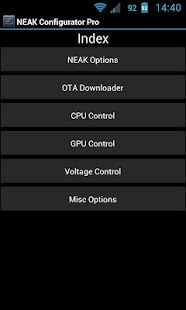
This App is for controlling the NEAK kernel options without having to use the CWM Recovery. This App is also used for downloading the NEAK kernel OTA updater App. This Pro App is also for advanced control of key hardware components.
*** IMPORTANT: For "Set on boot" to work you MUST click on "Set on boot" BEFORE clicking "Apply". Just ticking "Set on boot" will not activate set on boot, "Apply" button MUST be pushed after ticking the box. Te ensure "Set on boot" is active, close the app and re-open, and "Set on boot" should still be ticked if it is active. (If it is not ticked and you did hit apply after ticking the box, then your init.d folder is set to read only, and needs to be set to allow writing to this folder) ***
The current options that this Pro App can control are:
Conservative Governor
Lionheart Tweaks (for Conservative Governor)
Lazy Governor
SCHED_MC
Aftr Idle Mode
Ext4 Boost Optimisations
CPU Max/Min Frequencies
CPU Governor and I/O Scheduler
CPU Voltages
GPU Frequencies & Voltages
Second Core Mode Control, including hotplug thresholds
Charging current control
Basic screen gamma & min_bl
Note: NEAK kernel options settings require a reboot for the relevant modules to be loaded or removed
The NEAK kernel options gives 2 options for applying settings, you can apply setting and reboot later, or apply settings and reboot now The NEAK OTA section of this app will show the current installation status of the NEAK OTA Updator App and have a button for downloading the App.
The CPU, GPU, Voltage and Misc options all have the ability to set the settings on boot. The "Set on boot" checkbox must be checked BEFORE applying settings. Once checked it will remain applying all settings on boot until unchecked and apply pressed again.
For help with this app, please go to: http://forum.xda-developers.com/showthread.php?t=1561592
About N.E.A.K. Configurator Pro
The company that develops N.E.A.K. Configurator Pro is N.E.A.R. Team. The latest version released by its developer is 3.3.
To install N.E.A.K. Configurator Pro on your Android device, just click the green Continue To App button above to start the installation process. The app is listed on our website since 2013-11-17 and was downloaded 0 times. We have already checked if the download link is safe, however for your own protection we recommend that you scan the downloaded app with your antivirus. Your antivirus may detect the N.E.A.K. Configurator Pro as malware as malware if the download link to com.neak.configurator_pro is broken.
How to install N.E.A.K. Configurator Pro on your Android device:
- Click on the Continue To App button on our website. This will redirect you to Google Play.
- Once the N.E.A.K. Configurator Pro is shown in the Google Play listing of your Android device, you can start its download and installation. Tap on the Install button located below the search bar and to the right of the app icon.
- A pop-up window with the permissions required by N.E.A.K. Configurator Pro will be shown. Click on Accept to continue the process.
- N.E.A.K. Configurator Pro will be downloaded onto your device, displaying a progress. Once the download completes, the installation will start and you'll get a notification after the installation is finished.
Program Details
System requirements
Download information
Pricing
Version History
version 3.3
posted on 2013-11-17
version 3.3
posted on 2013-11-17
- Extra frequencies added to S3 GPU tab,- NEAK Kernel check updated (should now work on AOSP ROMS),- OTA downloader tab removed from app.
version 3.3
posted on 2012-12-30
Several fixes and updates
Disclaimer
External Download
We do not host N.E.A.K. Configurator Pro on our servers. We did not scan it for viruses, adware, spyware or other type of malware. This app is hosted by Galad and passed their terms and conditions to be listed there. We recommend caution when installing it.
The APK Download link for N.E.A.K. Configurator Pro is provided to you by apps112.com without any warranties, representations or guarantees of any kind, so access it at your own risk.
If you have questions regarding this particular app contact the publisher directly. For questions about the functionalities of apps112.com contact us.
